
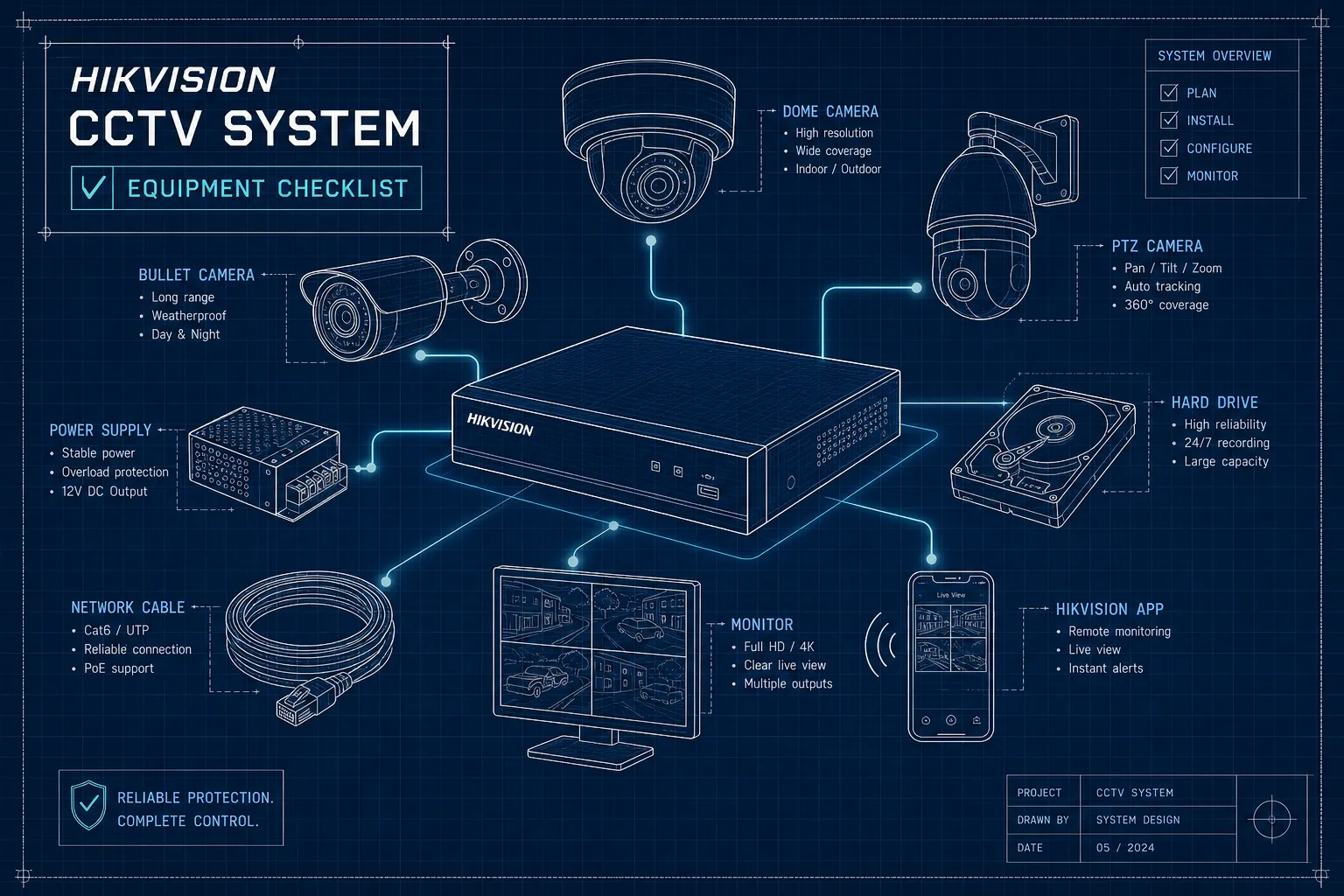
If you are asking what equipment do I need to install a complete Hikvision security camera system, this checklist gives you a precise answer. Many buyers settle on Hikvision cameras early in the process. The harder question comes next: what else does the system actually need to work? Missing even one component, the wrong cable type, a forgotten junction box, or a hard drive that was never ordered, can stall an entire installation by days. This article gives you a practical equipment checklist, not a general product overview. By the time you finish reading, you will have a precise list of components you can hand to an installer or walk into a supplier with and place a complete order.
One note before the list: sourcing all your components from a single authorised Hikvision dealer in Nairobi is far more reliable than piecing together cameras from one shop, an NVR from another, and cables from a hardware store. Compatibility issues and grey-market products are among the most common reasons Hikvision systems underperform after installation. We will cover where to get everything in one place towards the end of this article. For now, the checklist: cameras first, then recording equipment, then cabling, then mounting hardware, and finally the full component list by system size.
Cameras: choosing the right Hikvision models for your site
Indoor vs outdoor IP rating
IP rating is the first specification to check, and it is more consequential than most buyers realise. Outdoor cameras covering perimeters, car parks, building entrances, and gates must carry an IP65 or IP67 rating to handle rain, dust, and humidity. Indoor cameras covering retail floors, offices, and corridors do not need the same weatherproofing, and specifying outdoor-rated units for purely indoor locations adds unnecessary cost. Before you settle on any camera model, mark each location on a floor plan and note whether it is indoor or outdoor. That single step determines which models you order.
Dome, bullet, and turret: which form factor per location
Dome cameras are tamper-resistant and suit indoor ceilings and vandal-prone spots; their flush-mounted profile makes them difficult to redirect by hand. Bullet cameras project outward on a bracket and work well for long-range outdoor coverage along perimeters and driveways. Turret cameras are the most versatile of the three: low-profile, simple to install, and appropriate for mixed-use sites where you need one camera type to cover multiple locations. Hikvision ColorVu models are the practical default for any location where full-colour night vision matters, including car parks, building entrances, and retail interiors. ColorVu cameras use a large-aperture lens and supplemental white light, so faces, clothing colours, and vehicle registration plates remain readable after dark rather than producing the grey infrared images that standard cameras deliver.
How many cameras do you actually need?
Map your blind spots before you count cameras. Wide-angle lenses cover more ground per unit; varifocal lenses let you adjust coverage distance and angle after installation. A well-planned layout with fewer varifocal cameras often delivers better coverage than a larger number of fixed wide-angle units placed without a coverage plan. Doing a basic floor plan sketch before you order saves both money and rework on installation day.
What equipment do I need to install a complete Hikvision security camera system, NVR and storage
PoE NVR vs non-PoE NVR: which one fits your setup
A PoE NVR combines the recorder and a built-in power switch into one unit. Cameras connect directly to the NVR via a single Cat6 network cable for CCTV, carrying both data and power. This is the cleaner choice for most residential and small commercial installs: fewer devices, simpler cabling, and one UPS to back up the entire system from a central point. The Hikvision AcuSense range covers 4-, 8-, and 16-channel PoE configurations, with models such as the DS-7604NXI-K1/4P, DS-7608NXI-K1/8P, and DS-7616NXI-K2/16P as practical starting points for most Nairobi installations.
A non-PoE NVR paired with a separate power-over-ethernet switch for Hikvision cameras gives more flexibility for larger sites where cameras are spread across multiple network segments or buildings. For most installations under 16 cameras in a single building, a PoE NVR is the simpler and more cost-effective solution. Whichever route you choose, always buy one or two channels above your current camera count. A 4-camera site almost always grows to five or six cameras within two years as blind spots become apparent. Buying the correct channel count upfront costs nothing; replacing an undersized NVR later costs significantly more.
Hard drive sizing: how much storage do you need
Only surveillance-grade hard drives belong inside an NVR. Consumer drives are not designed for the continuous read/write cycles of 24/7 recording and fail far sooner than their rated lifespan suggests. Western Digital Purple and Seagate SkyHawk are the widely accepted standards for Hikvision systems. For sizing, calculate from your per-camera bitrate, frames per second, and target retention period rather than relying on fixed numbers, since H.265+ efficiency, motion-triggered recording, and resolution all affect the final figure significantly. As a conservative starting point, an 8-camera system recording at 4MP using H.265+ compression typically requires around 8TB for 30 days of continuous footage; a 4-camera system at the same specification needs roughly half that. When in doubt, size up. Adding a second hard drive bay after installation is more disruptive than ordering the correct capacity at the outset. Use Hikvision's online storage calculator or ask your supplier to run the calculation for your exact camera specifications.
What equipment do I need to install a complete Hikvision security camera system, cabling and power
Cat5e vs Cat6 vs outdoor UV-rated Cat6
Cat5e handles most indoor CCTV runs adequately, but Cat6 is the better default for all new installations. It offers greater headroom for PoE stability, performs more consistently across longer runs, and accommodates future upgrades without a full recable. For any cable exposed to sunlight, rain, or humidity, outdoor UV-rated Cat6 with a black PE or LLDPE jacket is non-negotiable. Standard indoor cable can degrade noticeably faster when exposed to equatorial sun and Kenya's long rains: the jacket cracks, moisture enters the conductors, and PoE performance drops unpredictably. The resulting faults are intermittent and difficult to trace.
Keep all runs under 100 metres per camera, including patch cables and slack at each end. A practical planning rule: measure the actual cable route, not the straight-line distance, then add 15% for routing around corners, service loops, and termination. A 30-metre route becomes a 35-metre order. For roof-mounted or exposed external runs, fit the cable inside UV-resistant conduit. This adds a layer of physical protection and makes future cable replacements far easier.
PoE vs 12V DC power: making the right call
PoE is the right choice for most Hikvision IP camera installations. One cable handles both data and power, UPS backup covers all cameras through a single device, and there is no need for a power outlet at each camera position. 12V DC makes sense when a camera sits close to an existing power outlet or when a site already operates on a DC power layout. One important caveat: PTZ cameras and models with high-power illuminators often require PoE+ (IEEE 802.3at) rather than standard PoE (IEEE 802.3af). Confirm each camera's power draw before specifying the switch or NVR. Most Hikvision 4-channel PoE NVRs carry a total PoE budget of around 50W across all ports, which is adequate for four standard fixed cameras but tight if any of them are high-power models.
RJ45 connectors and patch cables
Order more RJ45 connectors than you think you need. Termination errors happen, especially on outdoor runs where working conditions are less controlled. Budget for a proper crimping tool rather than borrowing one; a poorly crimped connector introduces intermittent faults that can take hours to locate. Short patch cables to connect the NVR to your router or network switch are easy to forget; include them on your order from the start.
Mounting hardware and outdoor weatherproofing
Brackets, junction boxes, and pole mounts
Every camera needs a bracket matched to its form factor and the surface it mounts on: wall, ceiling, pole, or corner. Junction boxes sit between the camera and the mounting surface, protecting the cable entry point from water ingress and providing a clean, professional finish. They are especially important for outdoor installations, where an unsealed cable entry is a direct path for water into the wall cavity or camera housing. For perimeter and car park cameras in Kenya, pole mounts in galvanised steel or aluminium are the correct choice. Avoid mild steel, which corrodes quickly under UV exposure and seasonal rainfall.
Weatherproofing essentials for Kenyan conditions
Silicone sealant around every outdoor cable entry point is a step many installers skip, and water ingress through unsealed entries is a well-documented cause of camera faults that can appear months after installation. A sealed entry takes two minutes; tracing a water-related fault takes far longer. Surge protectors on outdoor camera runs protect the NVR and cameras during electrical storms, which are frequent across many parts of Kenya. Several Hikvision outdoor camera models include built-in TVS 6000V surge protection; pairing these with a Hikvision PoE switch rated for 6kV surge protection on the network side provides a fully protected outdoor run. UV-resistant cable ties and conduit on exposed external walls or rooftops complete the weatherproofing.
Your complete Hikvision IP camera kit components by camera count
The lists below are starting templates. Cable quantities depend on your specific site layout; all other items scale directly with camera count. Use these as your base and verify quantities against your actual floor plan before placing an order.
4-camera system checklist:
- 4x Hikvision IP cameras (indoor/outdoor mix per site survey)
- 1x 4-channel PoE NVR (AcuSense DS-7604NXI-K1/4P or equivalent)
- 1x surveillance-grade hard drive sized to your retention period (WD Purple or Seagate SkyHawk; approximately 4TB for 30 days at 4MP H.265+ as a starting estimate)
- 1 roll outdoor UV-rated Cat6 cable (approximately 100 to 150 metres depending on layout; measure your routes and add 15% slack)
- 1 bag of RJ45 connectors plus a crimping tool
- 4x camera wall or ceiling brackets matched to camera model
- 4x junction boxes for outdoor camera positions
- 1x UPS for the NVR
- Silicone sealant and surge protectors for all outdoor runs
8-camera system checklist:
- 8x Hikvision IP cameras (indoor/outdoor mix per site survey)
- 1x 8-channel PoE NVR (AcuSense DS-7608NXI-K1/8P or equivalent)
- 1x surveillance-grade hard drive sized to your retention period (approximately 8TB for 30 days at 4MP H.265+ as a conservative starting estimate)
- 1 roll outdoor UV-rated Cat6 cable (approximately 200 to 300 metres depending on layout; measure routes and add 15% slack)
- All brackets, junction boxes, connectors, and weatherproofing items scaled to 8 cameras
- 1x UPS for the NVR
For a 16-camera system, move to a 16-channel PoE NVR such as the DS-7616NXI-K2/16P, or pair a standard NVR with a separate PoE switch for sites where cameras are spread across multiple areas. Calculate your hard drive requirement from per-camera bitrate, resolution, and target retention; at 4MP with H.265+, 16 cameras recording continuously for 30 days typically requires 16TB or more, and dual drives are advisable on any site where continuous recording is operationally critical.
Where to source your entire Hikvision kit in Nairobi
The most common mistake Nairobi buyers make is sourcing components from multiple suppliers: cameras from one shop, an NVR from another, cables from a hardware store. The outcome is usually a mix of grey-market units with no warranty coverage, components that have not been confirmed compatible with each other, and no single supplier accountable when something does not work after installation.
Nashnaal Electronics stocks the complete range of genuine Hikvision components under one roof in Nairobi: cameras across all categories including ColorVu and AcuSense, PoE NVRs in 4-, 8-, and 16-channel configurations, surveillance-grade hard drives, PoE switches, outdoor-rated Cat6 cable, junction boxes, mounting hardware, and accessories. Sourcing directly through official Hikvision channels means every product carries a valid Hikvision warranty. There is no grey-market risk, and a local installation and after-sales support team is available when you need it.
Bring your camera count, a basic floor plan sketch, and your target retention period, and the team builds the exact Hikvision IP camera kit components list for your site. Enquire via WhatsApp or visit the Nairobi showroom. A free site survey is available with selected NVR bundle purchases (confirm availability with the team).
Build the right system from the start
A complete Hikvision CCTV system is more than cameras and a recorder. Every item on this checklist plays a specific role in whether the system performs reliably for years or develops faults within months. Cutting corners on the hard drive specification, the cable type, or the outdoor weatherproofing rarely saves money in the long run; it simply moves the cost to a future service call.
Before placing your order, confirm that your NVR channel count matches or exceeds your camera count, that your hard drive is sized for your target retention period, and that every outdoor cable run uses UV-rated Cat6 sealed at both ends with silicone. Use the checklists above as your starting point, then verify quantities against your actual site layout before ordering.
When you are deciding what equipment you need to install a complete Hikvision security camera system, use this checklist to confirm every component is accounted for before installation day. For genuine Hikvision components with valid warranty coverage and professional local support across Nairobi and Kenya, Nashnaal Electronics is the single source that covers everything on this list.